


Crypto payment gateway for your website and app
The SharPay crypto payment gateway lets customers pay in cryptocurrency on your website or in your app, while you see those payments in the same dashboard as your card payments. You connect it through an API, a hosted payment page or a plugin for WooCommerce and OpenCart, and a manager stays with you until the first live payment.
API and hosted pageWooCommerce and OpenCartCrypto and cards in one dashboardOnboarding from 5 days
Send a request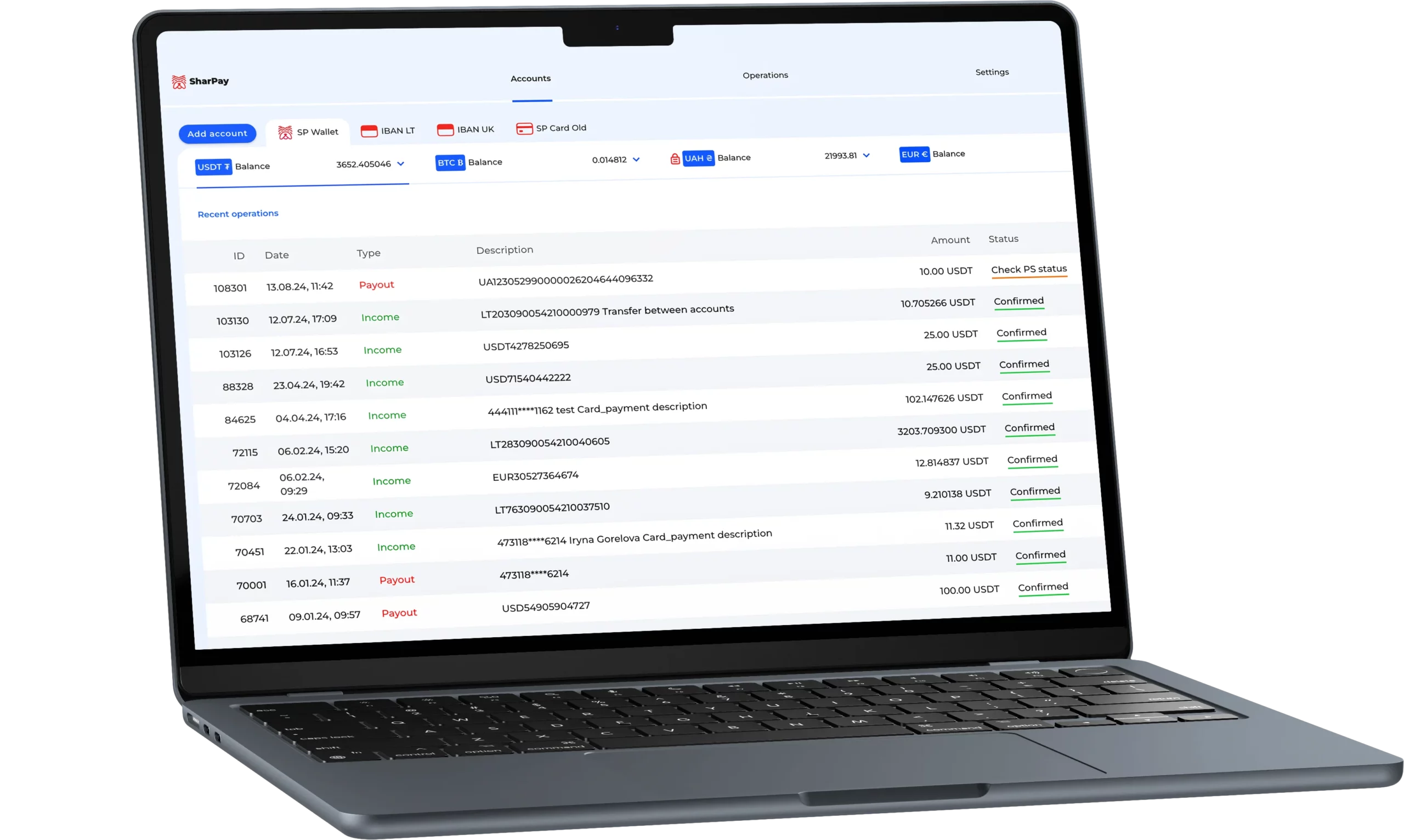
Why businesses choose the SharPay crypto gateway
Key features
✅ Crypto payment API
Host-to-host for your own checkout.
Documentation from our team.
✅ Hosted payment page
Customers pay on a SharPay page.
No payment form to build.
✅ Plugins
WordPress (WooCommerce) and OpenCart.
Other platforms via API or payment link.
✅ Payment links
For sales closed by chat or phone.
No checkout needed.
✅ One merchant dashboard
Crypto and card payments together.
One place to reconcile.
✅ Verified onboarding
KYC, KYB and AML before launch.
From 5 days with full documents.
How a crypto payment gateway works
A crypto payment gateway sits between your checkout and the blockchain. It turns an order on your site into a crypto payment request, follows that payment and tells your system when the order can be released.
1. The customer chooses crypto
At checkout, crypto appears as one more way to pay, next to cards. Alternatively, you send the customer a payment link, which works well when the sale happens in a chat or over the phone.
2. The payment request is created
The gateway creates a payment for the exact order amount. The customer sees what to pay and where to send it, either on the hosted payment page or inside your own checkout if you work through the API.
3. The network confirms the transfer
Crypto transfers are final once the blockchain confirms them, which is why a crypto payment goes through statuses instead of a single yes or no. Your shop should release the order only after the payment is confirmed.
4. You see it in the dashboard
The confirmed payment appears in the same merchant dashboard as your card payments. As a result, finance works with one report instead of two.
Crypto payment gateway API, hosted page or plugin
Crypto payment integration follows the same routes as card payments. Which one you pick depends on who builds your site and how much control you want over the checkout.
Hosted payment page
The quickest start. Your site sends the customer to a SharPay payment page, and after paying the customer returns to your shop. Since your side only handles the redirect, there is very little to build.
Crypto payment API (host-to-host)
For teams that want the whole checkout on their own domain or inside a mobile app. Your developers work with the API directly, and our team sends the documentation once your request is approved.
WooCommerce and OpenCart plugins
Ready-made plugins exist for two platforms only: WordPress with WooCommerce, and OpenCart. You install the module, enter your credentials and run test payments. For any other CMS, the route is the API or a payment link.
Payment links
No website, or a deal closed by email? A payment link lets the customer pay in crypto without a checkout, and the money is tracked in the dashboard just like a website payment.
How to accept crypto payments on your website
The integration itself is the smaller part of the work. What saves support tickets later is a few decisions made before launch.
Put crypto next to cards, not instead of them
Most customers will still pay by card, while a smaller group actively looks for crypto. With both on one checkout, you keep the first group and win the second. For cards, see our payment gateway page.
Decide when an order counts as paid
A crypto payment is not confirmed the moment the customer presses Send. For that reason, your shop should treat the order as paid only after the gateway reports a confirmed payment. How statuses reach your system is described in the documentation for your integration.
Explain the payment to customers
- Before payment — which coins and networks you accept, so nobody sends funds through the wrong network
- During payment — the exact amount and the time to complete it
- After payment — what happens if the transfer is late or the amount differs
Test before going live
Run several test payments through the hosted page or the plugin and check that orders change status correctly. Our article on using a cryptocurrency payment gateway to accept crypto payments covers the customer side in more detail.
Cryptocurrency payment gateway: supported coins and fees
Most questions come up here, so here are the published terms: seven coins, the network fee for crediting, and the choice to keep funds in crypto or convert them to euro inside SharPay.
Supported coins
Customers can pay in BTC, ETH, LTC, XRP, USDC, DAI and TUSD. Many merchants promote the stablecoins on that list (USDC, DAI and TUSD) first, because a price pegged to a fiat currency removes most of the volatility between payment and settlement.
How funds are credited
- Crediting fee — incoming crypto lands in your SharPay crypto wallet for the network fee
- Minimum deposit — BTC 0.001, ETH 0.003, LTC 0.001, XRP 1, DAI 10, TUSD 10, USDC 15
- Crypto or euro — keep the funds in crypto or convert them to euro inside SharPay; whatever you don’t convert stays in crypto
Fees
Crediting incoming crypto costs the network fee, and so does withdrawing it to an external wallet. Converting to euro inside SharPay carries the currency exchange fee, 1.5% for a business account. All rates are on the price page; for large volumes, terms can be discussed with your manager.
Blockchain payment gateway for online stores, SaaS and apps
The gateway itself is the same for everyone. What differs is how the checkout looks and which integration route gets you live fastest.
Online stores
Stores on WooCommerce or OpenCart start with a plugin, while custom stores use the hosted page or the API. Either way, crypto orders appear in the dashboard next to card orders.
SaaS and digital products
Digital goods are delivered immediately, so the order status matters even more. With the API, access can be granted as soon as the payment is confirmed. Mobile apps connect through the API as well, which keeps the payment screen inside your product.
When you need more than a gateway
If you are looking at the whole cycle, from checks to accounting and payouts, read about our crypto payment processing for business.
Crypto gateway and payouts in one account
Taking crypto in is only half the job. Partners and contractors often want to be paid in crypto too, and a separate service for that doubles the bookkeeping.
Payouts to crypto wallets
Payouts to crypto addresses run as part of mass payouts, alongside bank transfers and cards. You pay many recipients in one run, each by the method that suits them.
One dashboard for everything
Crypto payments, card payments and payouts sit in the same account. In practice, month-end reconciliation happens in one place instead of three. For card acceptance and settlement, see payment processing.
How to connect the SharPay crypto gateway
There is no self-service sign-up for businesses. Onboarding runs through our sales team, because every merchant is checked before the first payment.
1. Send a request
Tell us what you sell, your expected volume, where your customers come from and which platform your site runs on.
2. Pass the review
We run KYC, KYB and AML checks on the company and its owners: registration documents, licenses where your activity requires them, and the business model.
3. Agree terms and integration
Your manager goes over the supported coins and fees with you, then helps you choose between the API, the hosted page, a plugin or payment links.
4. Go live
Onboarding takes at least 5 days when the document package is complete. Before applying, it helps to read our guide on how to choose a crypto payment gateway.
FAQ
What is a crypto payment gateway?
It is a service that lets a website or app take payments in cryptocurrency. It creates a payment for the order, follows the transfer on the blockchain and reports to your shop when the payment is confirmed.
How do I accept crypto payments on my website?
If your site runs on WordPress with WooCommerce or on OpenCart, use the plugin. Any other site uses the hosted payment page or the API, and our team sends the documentation after the review.
Is there a crypto payment gateway API?
Yes. The host-to-host API lets you build crypto payments into your own checkout or app. Documentation is shared once your request is approved.
Which cryptocurrencies can my customers pay with?
BTC, ETH, LTC, XRP, USDC, DAI and TUSD. Incoming payments are credited to your SharPay crypto wallet for the network fee, and you can keep the funds in crypto or convert them to euro inside SharPay.
How long does it take to connect?
At least 5 days with a complete document package. The timeline depends on your documents and on how complex your business is.
Can I launch my own branded crypto gateway?
That is a separate product. See our white label page.